
Implementation-focused articles on building software that scales cleanly.
Transaction Lifecycle in WooCommerce + Authorize.Net (Auth, Capture, Settlement, Void, Refund)
This documentation explains how card transactions move through WooCommerce and Authorize.Net, and how to decide between capture, void, and refund. It also reflects capabilities commonly used with the Indatos Datamatix Authorize.Net WooCommerce gateway plugin, including authorize-only, capture later, refunds/voids from the order screen, and WooCommerce Blocks checkout support.
Product reference: Authorize.Net WooCommerce Plugin
1) TL;DR (READ THIS FIRST)
- Customer places order → Authorize.Net returns an approval, decline, or error response.
- Approved payments can be Auth+Capture (sale) or Auth-only (funds held).
- Captured transactions still require settlement (batch) before funds are finalized.
- Before settlement: use void. After settlement: use refund.
- This plugin supports: authorize-only, manual capture, partial refunds, and WooCommerce Blocks checkout.
2) QUICK GLOSSARY (PLAIN ENGLISH)
- Authorization (Auth): Funds are approved and held, but not yet collected.
- Capture: You collect the authorized funds (turns a hold into a charge).
- Settlement: Authorize.Net batches captured transactions for processing.
- Void: Cancels an authorized or captured transaction before it settles.
- Refund: Returns money after a transaction has settled.
- Auth-only mode: Authorize first, capture later (manual or workflow-based).
- Auth+Capture (Sale): Authorize and capture immediately.
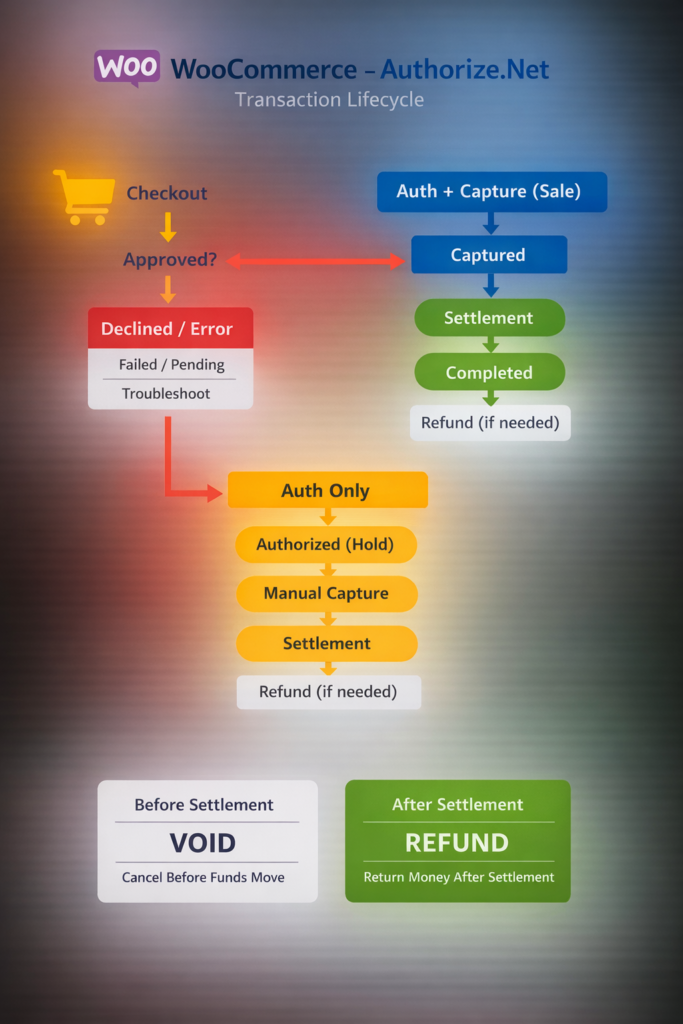
3) THE LIFECYCLE OF AUTHORIZE.NET TRANSACTION (ONE SIMPLE FLOW)
Checkout flow
Checkout
  → Approved?
     → NO: Declined/Error → WooCommerce shows failed/pending → troubleshoot/logs
     → YES:
         → Mode = Auth+Capture (Sale)
              → Captured
              → Settlement (batch)
              → Completed
              → If needed: Refund (after settlement)
         → Mode = Auth-only
              → Authorized (funds held)
              → Manual Capture (when you choose)
              → Settlement (batch)
              → Completed
              → If needed: Refund (after settlement)

Side paths:
- Void is available before settlement (authorization or capture can often be voided pre-settlement).
- Refund is used after settlement.
4) STEP-BY-STEP: WHAT HAPPENS WHEN CUSTOMER CLICKS “PLACE ORDER”
4.1 Payment initiated
- Customer enters card details at checkout (Blocks checkout can be supported, depending on your setup).
- WooCommerce creates the order and sends the payment request to Authorize.Net.
- Authorize.Net returns one of three outcomes: approved, declined, or error.
4.2 Response outcomes (what it means)
| Outcome | Customer sees | WooCommerce result | What you do |
|---|---|---|---|
| Approved | Order success | Processing or On-hold (depends on mode and settings) | Fulfill (sale) or review then capture (auth-only) |
| Declined | Payment failed | Failed | Customer retries or uses a different card |
| Error | Error message | Pending or Failed (varies) | Check logs, keys, mode, and gateway settings |
4.3 Mode matters: Auth+Capture vs Auth-only
A) Auth+Capture (Sale)
- Funds are captured immediately (customer is charged).
- Settlement happens later during Authorize.Net batch processing.
- Use refund after settlement if you need to return money.
B) Auth-only
- Funds are authorized and held.
- You decide when to capture.
- Useful for manual review, backorders, high-risk orders, address verification, or phone verification workflows.
5) MANUAL CAPTURE (AUTH-ONLY WORKFLOW)
5.1 When to use manual capture
- You want to verify stock, address quality, fraud signals, or customer details before charging.
- You fulfill later and want to capture closer to shipment date.
- You need a review step for high-value carts.
5.2 How manual capture works (high-level)
- Order is placed → status is commonly On-hold or similar (your store settings can change this).
- Admin reviews the order.
- Admin triggers capture from the WooCommerce order screen (manual capture supported).
- After capture, the transaction moves toward settlement.
5.3 Common capture mistakes
- Waiting too long (authorization holds can expire based on merchant settings).
- Attempting refund when you actually need void (pre-settlement).
- Capturing twice due to duplicate actions or plugin conflicts.
6) SETTLEMENT (WHY VOID VS REFUND CONFUSES PEOPLE)
6.1 Captured does not mean settled
- Capture is the action that creates a charge.
- Settlement is when the gateway batches transactions for processing.
- A transaction can be captured but not yet settled for a period of time.
6.2 The rule you should memorize
Pre-settlement: void
Post-settlement: refund
7) VOID VS REFUND (DECISION TREE + EXAMPLES)
7.1 Decision tree
Question: Has the transaction settled?
- No → void (fastest way to cancel; typically no money moves to the customer bank)
- Yes → refund (money is returned after settlement)
7.2 Real examples
- Customer cancels within minutes → void (often pre-settlement)
- Customer cancels next day → refund (often settled)
- You shipped the wrong item → partial refund (supported)
8) PARTIAL REFUNDS (SUPPORTED)
8.1 When to use partial refunds
- Item returned but shipping fee is kept
- One item out of multiple is refunded
- Price adjustment after purchase
8.2 How partial refunds work (conceptually)
- You choose a refund amount in WooCommerce.
- The plugin sends a refund request to Authorize.Net for that amount.
- The refund is tied to the original settled transaction.
8.3 Partial refund notes
- Multiple partial refunds may be possible depending on gateway and account settings.
- If the transaction is not settled yet, void is usually the correct action (refund can fail pre-settlement).
9) STATUS MAPPING: WOOCOMMERCE ↔ AUTHORIZE.NET (ADD TABLE)
Status mapping table template
This mapping can vary by store settings, plugin configuration, and your fulfillment rules. Use the table below as a starting template and adjust to match your setup.
| WooCommerce status | Authorize.Net state | Meaning | Action |
|---|---|---|---|
| Pending payment | Initiated or no transaction | Payment not completed | Retry or diagnose configuration |
| On-hold | Authorized | Funds held (auth-only) | Review and capture when ready |
| Processing | Captured or authorized (depends) | Paid or held | Fulfill or capture |
| Completed | Settled | Funds processed | Normal operations |
| Refunded | Refunded | Money returned | No further action |
| Failed | Declined or error | Payment not accepted | Customer retries; check logs if persistent |
10) BLOCKS CHECKOUT NOTES (SUPPORTED)
Blocks checkout support and display issues
- This plugin supports WooCommerce Blocks checkout.
- If checkout does not display the gateway, confirm the gateway is enabled in WooCommerce payments.
- Confirm you are using Blocks checkout (not classic checkout) if your site theme uses Blocks.
- Check for caching/minification conflicts and retest.
- Test with a default theme and temporarily disable conflicting plugins.
- Check plugin logs for gateway initialization errors.
11) TROUBLESHOOTING (SHORT + LINKS TO DEEPER DOCS)
11.1 Refund failed
Common causes:
- Transaction not settled yet (void is required instead of refund)
- Wrong keys, permissions, or mode mismatch
- Transaction ID mismatch
- Temporary gateway/API issue
11.2 Payment declined
- Bank decline, AVS/CVV mismatch, fraud filters, insufficient funds
- Try a different card and review fraud rules in the Authorize.Net dashboard
11.3 Duplicate charges
- Double click, refresh/back button behavior, or repeated checkout submission
- JavaScript issues caused by caching/minification
- Theme/plugin conflicts or multiple gateways interacting
Helpful links
- Indatos Authorize.Net insights and guides
- Authorize.Net error e00027 troubleshooting
- API keys explained (Login ID vs Transaction Key)
12) BEST-PRACTICE SETTINGS (RECOMMENDED DEFAULTS)
Recommended defaults
- For most stores: Auth+Capture (simpler operations)
- Use Auth-only when: manual review, high-risk orders, delayed fulfillment
- Enable logs only when troubleshooting; disable when stable
- Always test in sandbox before going live
13) FAQ (USE THIS FOR FAQ SCHEMA)
When does the money hit my bank?
Typically after capture and settlement, funds move through the payment network to your bank on a schedule defined by your merchant account and bank processing timelines. Settlement is the key point that separates void vs refund decisions.
Why can’t I void this transaction?
Voids generally apply before settlement. If the transaction has already settled, you usually must refund instead.
Why did my refund fail?
The most common reason is that the transaction has not settled yet. In that case, void is usually the correct action. Other reasons include configuration issues, key/mode mismatch, or gateway-side limitations.
Can I do partial refunds?
Yes. Partial refunds are supported. You select an amount in WooCommerce and submit the refund to Authorize.Net for that amount.
Can I authorize only and capture later?
Yes. Authorize-only (capture later) is supported. This is useful for manual review workflows or delayed fulfillment.
Does it work with WooCommerce Blocks?
Yes. Blocks checkout is supported. If the gateway does not appear, review the Blocks troubleshooting section and check for caching or plugin conflicts.
Where do I find transaction logs?
Log locations depend on your site configuration and plugin settings. Check the plugin’s logging option in the gateway settings, and review WooCommerce logs in the WordPress admin if enabled.
Recommended next actions
- Install and setup: Installation and setup guide
- Troubleshooting deep dive: Error codes and e00027 troubleshooting
- Product page and licenses: Authorize.Net WooCommerce plugin
- Contact support: Support and contact
What to include when contacting support
- Order ID and transaction ID (if available)
- Time of the attempt and your store timezone
- Whether the transaction was auth-only or sale
- Whether the gateway was in sandbox or production mode
- Relevant log excerpts (remove cardholder data)
Author: Neha Jain
Neha Jain is a software engineer focused on payments and API-driven integrations, including webhooks, authentication, error handling, and secure deployment patterns. Her work emphasizes production-ready implementations, with attention to vendor specifications, common failure modes, and integration reliability. She brings a practical approach to system design, balancing performance, security, and maintainability. Neha’s focus is on helping teams implement complex technical workflows with clarity and fewer regressions.
Related Posts
- Why SSL Is Required for Authorize.Net Payments in WooCommerce
- Top 5 Authorize.Net Fraud Filters to Protect Your WooCommerce Store From Chargebacks
- Sandbox Setup and Testing Guide for Authorize.Net WooCommerce Plugin
- Unlocking e00027 Authorize.net: Troubleshooting Tips & Solutions
- Production-Ready WooCommerce Store Launch Audit
- How to Install and Set Up WooCommerce on WordPress
