
Implementation-focused articles on building software that scales cleanly.
How Much Does It Cost to Build a Shopify App in 2026?
Ask two agencies what a Shopify app costs and you’ll get two answers that barely live on the same planet. One quotes $3,000. The next comes back at $150,000 for what sounds like the same brief. Both can be right, which is exactly why Shopify app development cost is so hard to pin down: the number depends almost entirely on what you’re building, who it serves, and how deep the integrations run.
So here’s a framework instead of a guess. This is a practitioner’s breakdown of what it actually costs to build a Shopify app in 2026, sorted by app type, with the real cost drivers, the ongoing fees most founders forget to budget, and the warning signs of a quote that’s too cheap to deliver. We build these apps for a living, so the ranges here reflect focused, efficient delivery rather than padded retainers.
What Determines Shopify App Development Cost?
The single biggest factor in Shopify app development cost is whether your app is private, built for one store, or public, listed on the App Store for any merchant to install. Everything else stacks on top of that one decision: feature count, integration depth, UI polish, and who does the work.
A private app is a project. You build it once, maintain it as Shopify evolves, and retire it when it stops earning its keep. A public app is a business, with support obligations, billing logic, marketing, and platform compliance that compound long after launch.
That distinction saves people real money.
Most merchants who think they need a custom app actually need a private internal tool, or a configuration that requires no app at all. Getting that wrong is how founders end up funding a six-month build that should have shipped in six weeks.
How Much Does It Cost to Build a Shopify App by Type?
A lean private Shopify app costs roughly $2,500 to $12,500 to build, a mid-level embedded app runs $7,500 to $20,000, a public App Store MVP lands around $12,500 to $40,000, and enterprise-grade apps start near $25,000 and climb from there. Here is how those tiers break down in 2026:
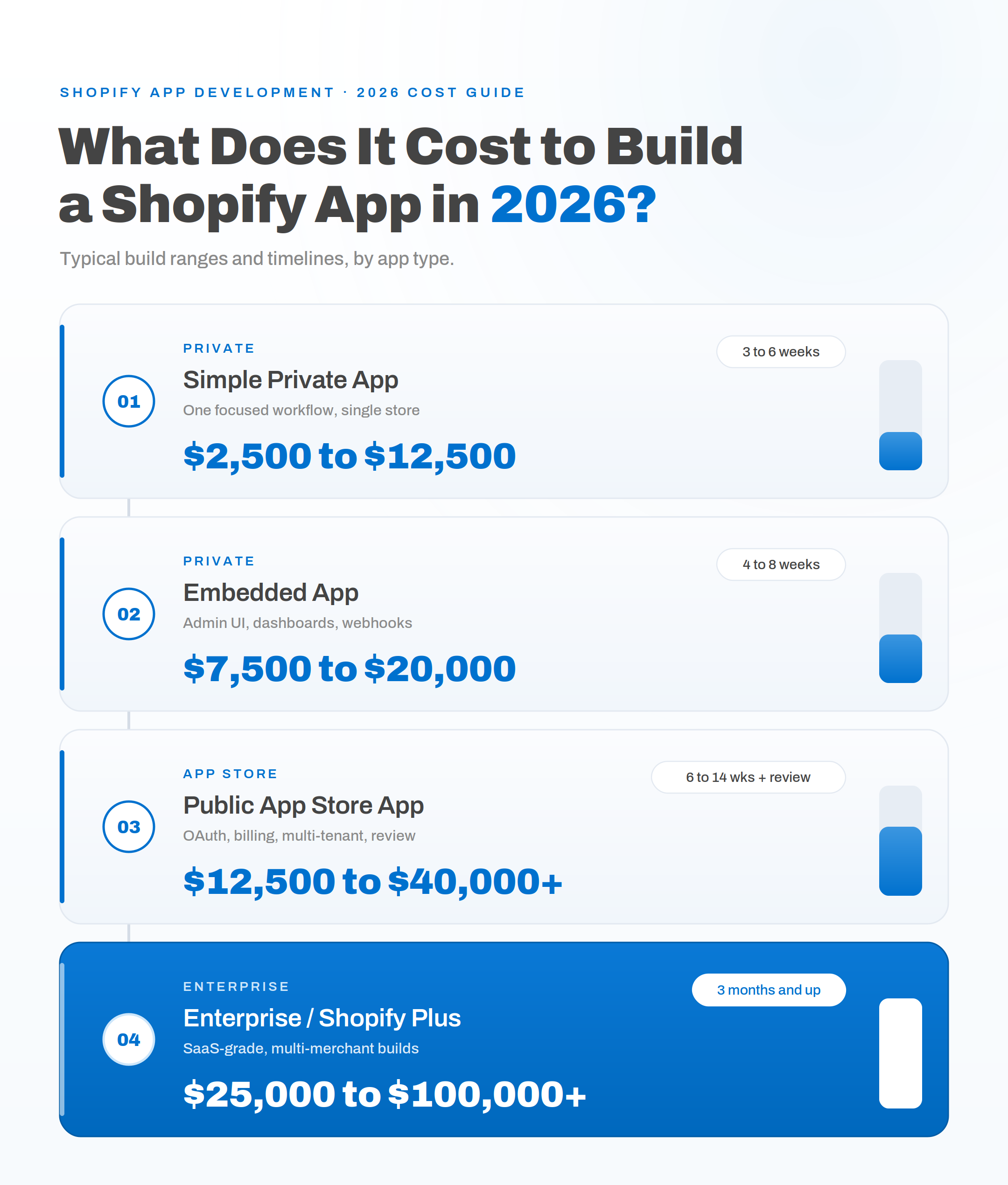
These figures assume an efficient build with a tight scope, not a bloated engagement billed by the hour. A padded agency quote for the same work can run two to three times higher without adding real value.
The gap between private and public pricing comes down to engineering load. A private app talks to Shopify through the Admin API and often lives inside a single store’s workflow. A public app has to handle OAuth, session tokens, multi-tenant data isolation, the Billing API, and the mandatory GDPR webhooks (customers/data_request, customers/redact, and shop/redact) that Shopify requires for any App Store listing. You can see the full set of obligations in Shopify’s official app development documentation. That compliance surface is why the same core workflow typically costs 30 to 50 percent more once it becomes a public listing.
Then there’s the review queue. First-time App Store submissions take two to eight weeks on top of the build, and reviewers reject apps that don’t feel native or handle uninstall cleanup correctly.
What Drives Shopify App Development Cost Up or Down?
Two apps with the same one-line description can differ in price by a factor of five, and the reasons are always the same handful of variables. Understanding what moves the number gives you real control over your budget. These are the levers that matter most:
- App type. Private versus public is the dominant driver, for every reason covered above. It sets your baseline before a single feature is scoped.
- Feature count and complexity. A single-task app is quick and cheap. Once you stack automation workflows, reporting dashboards, role-based permissions, and custom business logic, engineering hours climb fast.
- Integration depth. An app that lives only in the Shopify admin is far cheaper than one that syncs bi-directional data with an ERP, a 3PL, or a legacy CRM. External systems mean webhook handlers, field mapping, retry logic, and idempotency to keep data consistent when something fails.
- UI and UX. Embedded apps that feel native rely on Shopify’s Polaris components and App Bridge. Doing that well tends to add 10 to 20 percent to a build, and it pays for itself in merchant adoption and fewer support tickets.
- Tech stack. Most production apps run on Node and React, often with Remix or Next.js for the backend. Headless storefront work using Hydrogen is a different, costlier animal than a standard embedded admin app.
- AI and infrastructure. Custom recommendation or forecasting models need data-science work that raises the budget, and every app carries hosting costs on a cloud platform like AWS or Google Cloud.
What Are the Ongoing Costs After Launch?
Plan for annual maintenance of 15 to 25 percent of your build cost, because Shopify ships several API version updates every year and apps break when they fall behind. On a $15,000 build, that works out to roughly $2,250 to $3,750 a year, or a few hundred dollars a month, before you touch hosting or new features.
This is the line item that blindsides people. Shopify deprecates old API versions on a rolling schedule, so an app you ship and forget will stop working within a year or two. Maintenance isn’t optional insurance. It’s the cost of staying compatible.
Public apps carry more.
If your app is listed on the App Store, year-one operating costs (support, onboarding flows, listing optimization, and paid acquisition) routinely exceed the build cost itself. That’s the difference between a project and a product, and it’s the reason we push clients toward a private app whenever the business case allows it.
How to Avoid Overpaying for a Shopify App
The fastest way to waste money on a Shopify app is to accept a number before anyone has scoped the work. App development is genuinely scope-dependent, so a vendor who quotes a flat figure without seeing your requirements is either padding the estimate or guessing. Neither ends well.
Watch for a few tells. A sub-$2,500 quote for a “real” app almost always means template-level work that needs rebuilding within months. Silence on OAuth, webhook reliability, and error handling is a sign of fragile engineering, because those are the non-negotiable foundations of anything running against a live store. And a shop that talks in billable hours instead of outcomes is optimizing for its invoice, not your result.
Now the levers that bring cost down honestly. Define a minimum viable product and ship the core workflow first, then add features once the app proves useful. Choose a private app over a public one unless you’re truly building a product for other merchants. Use Shopify’s native features and Flow automations before commissioning custom code, since the platform absorbed a lot of that work in recent releases. And insist on a written specification before development starts.
If you’re still weighing platforms before you invest in app work at all, our breakdown of Shopify versus WooCommerce running costs covers that decision. When you’re ready to scope the app itself, our Shopify app development team produces a written spec and a fixed number before committing, so there’s no scope drift halfway through.
Planning a Realistic Shopify App Budget
Start your budget with the one question that decides everything: does this app serve your store, or does it serve a market? A private tool for your own operations is a contained investment you can size confidently. A public product is an ongoing commitment, and it deserves a best-case, expected-case, and worst-case model before you spend a dollar.
From there, the math is straightforward. Pick your app type, add a realistic feature scope, factor the integrations you genuinely need, and set aside 15 to 25 percent of the build for annual upkeep. That gives you a total cost of ownership figure rather than a launch-day sticker price, which is the only number worth planning around.
Honesty is the cheapest cost-control tool there is. A build partner who tells you that you need a private app, or no app at all, will save you more than any discount.
Frequently Asked Questions
How much does a basic Shopify app cost in 2026? A basic private Shopify app that solves one focused workflow, such as order tagging, a custom report, or an ERP sync, costs roughly $2,500 to $12,500 and ships in three to six weeks. Cost climbs with each added feature, integration, and admin interface.
Is a private Shopify app cheaper than a public one? Yes, usually by 30 to 50 percent for the same core workflow. Private apps skip the App Store review queue, multi-tenant architecture, the Billing API, listing assets, and GDPR webhooks for non-EU merchants, all of which add engineering time to a public build.
How long does it take to build a Shopify app? A focused private app takes three to six weeks. A mid-level embedded app runs four to eight weeks, and a public App Store app usually needs six to fourteen weeks of build plus two to eight weeks of Shopify review before it goes live.
How much does Shopify app maintenance cost per year? Budget 15 to 25 percent of your build cost annually. Shopify releases several API versions a year and retires old ones on a schedule, so ongoing maintenance keeps your app compatible and is a required cost, not an optional one.
Getting the scope right is worth more than shaving a few thousand off the quote. If you want a real number built around your actual workflow, integrations, and growth plans, talk to our team about your Shopify app and we’ll map the scope and the budget before any code gets written.
Author: Neha Jain
Neha Jain is a software engineer focused on payments and API-driven integrations, including webhooks, authentication, error handling, and secure deployment patterns. Her work emphasizes production-ready implementations, with attention to vendor specifications, common failure modes, and integration reliability. She brings a practical approach to system design, balancing performance, security, and maintainability. Neha’s focus is on helping teams implement complex technical workflows with clarity and fewer regressions.
Related Posts
- Top 5 SEO Audit Apps for 2026 (And Why Local Crawlers are Winning)
- How to Migrate From WooCommerce to Shopify: A Step-by-Step Guide
- Algolia vs Elasticsearch vs Meilisearch for Ecommerce Search
- Shopify vs WooCommerce for Small Businesses: Which Costs Less to Run?
- What Counts as Valid Consent Under DPDPA, and How to Implement It in WooCommerce
- Top 10 WordPress Plugins to Supercharge Your WooCommerce Store
