
Implementation-focused articles on building software that scales cleanly.
Top 10 WordPress Plugins to Supercharge Your WooCommerce Store
Running a successful online store requires more than just adding products and hitting “Publish.” Out of the box, WooCommerce provides a solid foundation. However, turning standard visitors into paying, repeat customers requires the right ecosystem of extensions.
Installing plugins indiscriminately can lead to slow page loads and conflicting scripts. To help you build a fast and high-converting store, we have curated the 10 essential WordPress plugins for WooCommerce, categorized by performance, conversion optimization, SEO, and store management.
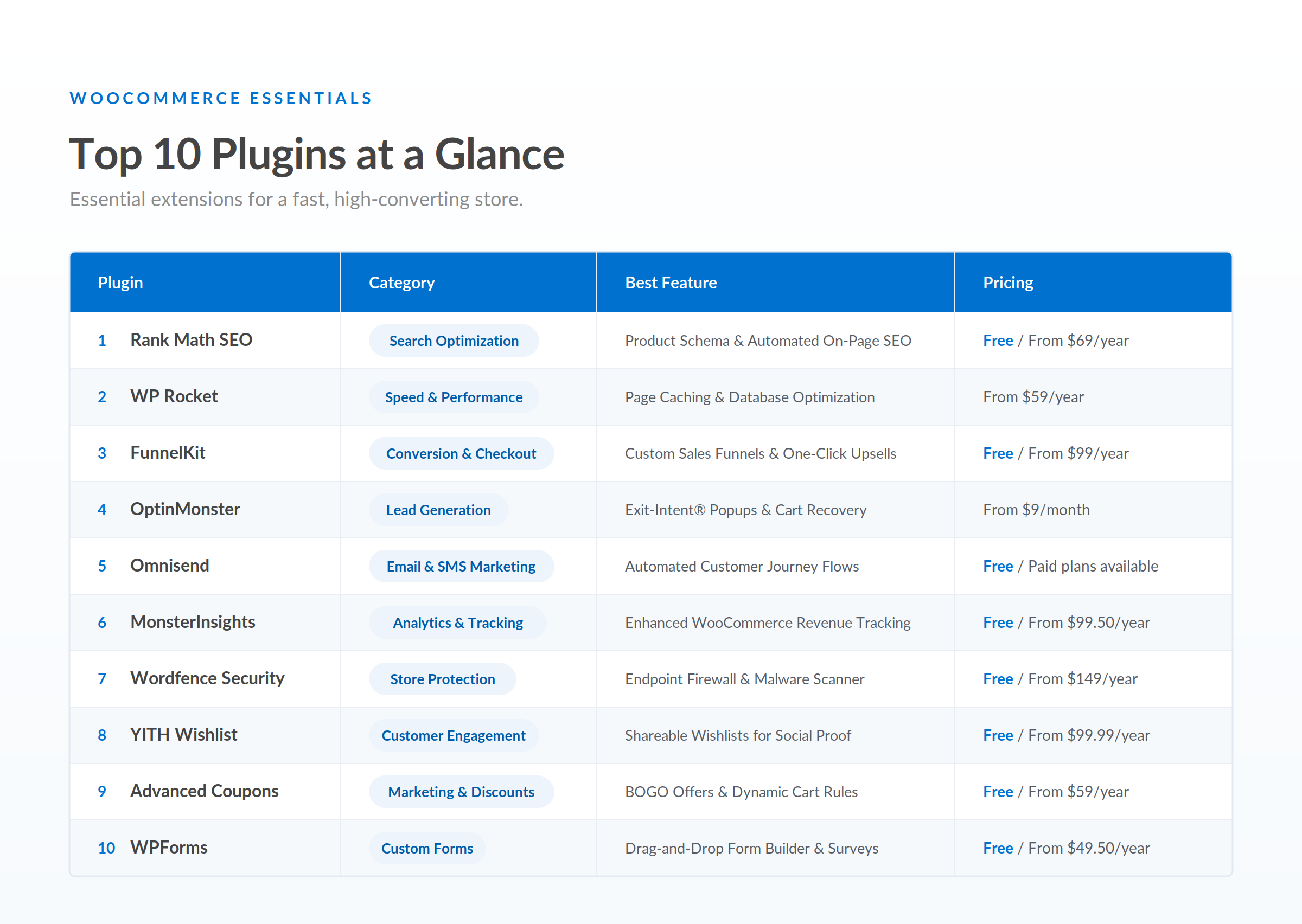
Detailed Reviews: The Top 10 WooCommerce Plugins
1. Rank Math SEO
Category: Search Engine Optimization
While default WordPress handles standard SEO decently, WooCommerce requires granular metadata control for individual products, categories, and tags. Rank Math SEO automates rich snippets (Product Schema) so search engines display your prices, star ratings, and stock availability directly in search results.
- Key Features: Automated Product Schema markup, smart internal linking suggestions, and built-in XML/HTML Sitemap generation.
- Pricing: Free version available. Pro plan starts at $69/year.
- Repository Link: Rank Math SEO on WordPress.org
2. WP Rocket
Category: Site Performance & Speed Optimization
A one-second delay in page load time can cause conversions to drop significantly. WP Rocket is widely regarded as the premier performance plugin for WooCommerce. Unlike standard caching tools, it automatically excludes sensitive WooCommerce pages (like Cart, Checkout, and My Account) from dynamic caching to prevent technical glitches during customer transactions.
- Key Features: Page caching, browser caching, lazy loading for product images, and minification of JavaScript and CSS files.
- Pricing: Starts at $59/year.
- Repository Link: WP Rocket is a premium-only tool and is not hosted on WordPress.org. For a free repository alternative, consider LiteSpeed Cache.
3. FunnelKit (formerly WooFunnels)
Category: Checkout & Sales Funnels Optimization
The default WooCommerce checkout page layout can feel rigid and outdated. FunnelKit allows store owners to completely revamp the checkout process using custom multi-step checkouts, order bumps, and post-purchase one-click upsells.
- Key Features: Custom slide-in cart, A/B testing capabilities for checkout designs, and pre-made templates compatible with popular page builders.
- Pricing: Free lite version available. Pro plans start at $99/year.
- Repository Link: FunnelKit on WordPress.org
4. OptinMonster
Category: Conversion Rate Optimization (CRO) & Lead Capture
Cart abandonment remains one of the biggest profit drainers for ecommerce stores. OptinMonster addresses this using its signature Exit-Intent® technology. The plugin detects when a user is about to leave your site and triggers a targeted pop-up offer, such as a discount code or free shipping incentive.
- Key Features: Behavioral target triggers, cart abandonment recovery popups, and gamified opt-in wheels.
- Pricing: Starts at $9/month (billed annually).
- Repository Link: OptinMonster on WordPress.org
5. Omnisend for WooCommerce
Category: Email & SMS Marketing Automation
While standalone platforms like Mailchimp are popular, Omnisend was designed specifically for ecommerce. It connects directly to your WooCommerce store to trigger automated messages based on actual buyer activity.
- Key Features: Pre-built automated workflows, combined Email and SMS marketing channel management, and precise audience segmentation based on purchase history.
- Pricing: Free plan available (up to 500 emails/month). Paid plans scale with the subscriber list size.
- Repository Link: Omnisend on WordPress.org
6. MonsterInsights
Category: Analytics & Tracking
You cannot optimize what you do not measure. MonsterInsights bridges Google Analytics 4 (GA4) with your WordPress dashboard, delivering actionable ecommerce reports without requiring custom JavaScript code.
- Key Features: One-click GA4 ecommerce setup, real-time product performance tracking, and top referral traffic analysis.
- Pricing: Free version available. Pro plan for WooCommerce starts at $99.50/year.
- Repository Link: MonsterInsights on WordPress.org
7. Wordfence Security
Category: Cyber Security & Site Protection
Ecommerce stores handle sensitive customer details and online transaction data, making them prime targets for malicious attacks. Wordfence acts as an endpoint firewall and security scanner tailored to shield WordPress applications.
- Key Features: Real-time Web Application Firewall (WAF), malware scanner for core files, and Two-Factor Authentication (2FA) for admin accounts.
- Pricing: Free core version. Premium plan starts at $149/year.
- Repository Link: Wordfence on WordPress.org
8. YITH WooCommerce Wishlist
Category: User Experience & Retention
Allowing shoppers to save items for later increases future visit conversions. YITH WooCommerce Wishlist gives users a seamless way to bookmark products, which they can later review or share with friends and family via social media.
- Key Features: “Add to Wishlist” buttons directly on product grids, social media sharing links, and admin insights into frequently saved products.
- Pricing: Free version available. Premium version starts at $99.99/year.
- Repository Link: YITH Wishlist on WordPress.org
9. Advanced Coupons
Category: Marketing & Promotional Rules
The built-in coupon functionality in WooCommerce is somewhat basic. Advanced Coupons expands your marketing toolkit, enabling complex promotional deals like Buy-One-Get-One (BOGO), auto-applied cart discounts, and gift cards.
- Key Features: BOGO deals with customizable product rules, cart condition rules, and URL-based auto-applying coupons for targeted ad campaigns.
- Pricing: Free version available. Premium starts at $59/year.
- Repository Link: Advanced Coupons on WordPress.org
10. WPForms
Category: Custom Forms & Customer Support
Every store needs clear communication channels for pre-sale questions, custom quote requests, and order support. WPForms offers a lightweight drag-and-drop builder to construct tailor-made contact forms, feedback surveys, and return request workflows.
- Key Features: Intuitive drag-and-drop form interface, pre-built ecommerce form templates, and spam protection via Smart CAPTCHA integrations.
- Pricing: Free version available. Paid plans start at $49.50/year.
- Repository Link: WPForms on WordPress.org
How to Choose WooCommerce Plugins Without Slowing Down Your Store
Adding too many plugins can introduce code conflicts, consume server CPU, and ruin your Core Web Vitals score. Follow these essential best practices when extending WooCommerce:
- Prioritize Quality Over Quantity: Stick to essential and well-rated tools from trusted developers. A good rule of thumb is to keep your active plugins under 20 total.
- Test in a Staging Environment: Never install a new plugin directly onto your live production store. Always test on a staging site to monitor for PHP errors or visual glitches.
- Check Update Frequency: Verify that the plugin developer releases updates regularly to maintain compatibility with the latest versions of WordPress and WooCommerce.
Frequently Asked Questions (FAQ)
How many plugins are too many for a WooCommerce store?
There is no hard rule for the exact number of plugins. Site speed is governed by code quality rather than sheer quantity. Five poorly coded plugins can impact load times far more negatively than 25 lightweight and well-optimized plugins.
Do I need a caching plugin for WooCommerce?
Yes. Caching plugins dramatically reduce page server load times. However, you must make sure your caching tool is properly configured to exclude sensitive dynamic pages like /cart/ and /checkout/.
Are free WooCommerce plugins safe to use?
Free plugins hosted on the official WordPress.org repository undergo basic security checks and community review. However, premium plugins typically offer faster security patch responses, dedicated developer support, and broader feature sets suitable for growing online businesses.
Building a successful WooCommerce store is not about using every tool available. It is about picking the right set of plugins that address speed, marketing, conversion, and user experience.
If you are just launching, prioritize WP Rocket for speed, Rank Math for organic reach, FunnelKit for optimized checkouts, and Wordfence for security. Once your store achieves consistent sales volume, you can scale up with advanced tools like OptinMonster and Omnisend to maximize average customer value.
Author: Neha Jain
Neha Jain is a software engineer focused on payments and API-driven integrations, including webhooks, authentication, error handling, and secure deployment patterns. Her work emphasizes production-ready implementations, with attention to vendor specifications, common failure modes, and integration reliability. She brings a practical approach to system design, balancing performance, security, and maintainability. Neha’s focus is on helping teams implement complex technical workflows with clarity and fewer regressions.
Related Posts
- Top 5 SEO Audit Apps for 2026 (And Why Local Crawlers are Winning)
- What Counts as Valid Consent Under DPDPA, and How to Implement It in WooCommerce
- How to Migrate From WooCommerce to Shopify: A Step-by-Step Guide
- Algolia vs Elasticsearch vs Meilisearch for Ecommerce Search
- Shopify vs WooCommerce for Small Businesses: Which Costs Less to Run?
- How DPDPA Will Impact WooCommerce Stores in India
