
Implementation-focused articles on building software that scales cleanly.
Top 5 SEO Audit Apps for 2026 (And Why Local Crawlers are Winning)
Key takeaways
- Local desktop crawlers reach staging sites, localhost, and password-protected builds that cloud bots cannot touch, which is why more technical SEOs run audits on their own hardware.
- Cloud suites raised prices again this year. Ahrefs moved its Lite plan to $129 per month in March 2026, and Semrush’s entry SEO tier sits near the same mark.
- Screaming Frog stays free to 500 URLs and costs $279 per year after that. Sitebulb has no permanent free tier, starting at $18 per month on Lite.
- Crawlpit Monster crawls up to 50,000 pages per project on macOS at no cost, with crawl data staying on the device.
- Pick the tool by what it can reach and what it costs per audit, not by feature-list length.
Your client’s redesign is sitting on a staging subdomain behind HTTP auth. The cloud crawler you pay $129 a month for cannot get in. So you either hand the credentials to a third-party platform and hope the NDA language covers it, or you go find a tool that runs on your own machine.
That scenario, repeated across thousands of freelance and boutique agency workflows, explains the quiet migration back to desktop software. The five SEO audit apps below span both camps, and the gap between them in 2026 comes down to three practical questions: what does an audit cost you, what can the crawler actually reach, and where does the crawl data live once the job is done.
Why Are Local Crawlers Beating Cloud SEO Audit Tools in 2026?
Local crawlers win on access, cost, and confidentiality. A crawler running on your laptop can request any URL your browser can request, including localhost builds, IP-restricted environments, and sites still hidden behind basic auth. Cloud bots originate from the vendor’s infrastructure, so anything not publicly reachable is invisible to them without extra configuration, IP allowlisting, or a support ticket.
Then there is the metering problem.
Cloud audit platforms charge by crawl credits, and those credits reset monthly whether or not you used them well. Run one exploratory crawl on a 200,000-URL ecommerce catalog with faceted navigation switched on, and a month’s allocation can vanish before lunch. Ahrefs raised base plan prices roughly 25% in March 2026 and moved additional Standard seats from $30 to $50 each. Desktop licensing simply does not work that way: you pay once, you crawl as often as your hardware allows.
Confidentiality is the third pressure. Enterprise clients increasingly write data residency and subprocessor clauses into agency contracts, and “we uploaded your unreleased site architecture to a US SaaS platform” is an awkward line to defend in a security review. When the crawl never leaves the machine, that conversation disappears.
None of this means cloud tools are obsolete. Scheduled monitoring, shared dashboards, and audit findings sitting next to backlink and keyword data still carry real weight for in-house teams. But for the freelancer running four audits a week on borrowed time and a MacBook, the math has shifted hard toward local.
The Top 5 SEO Audit Apps for 2026
1. Crawlpit Monster: Best Free SEO Audit App for Mac
Crawlpit Monster is a local-first technical crawler for macOS that handles up to 50,000 pages per project and runs entirely in-process on your machine. There is no account, no sign-in, and no server component. It is free to download and free to use, with no crawl credits to spend and no card required.
What it does well:
- Full crawls instead of sampled ones. Every crawl is a complete crawl to the 50,000-page ceiling, which covers the large majority of client sites outside enterprise ecommerce. No partial passes, no incremental guesswork.
- Crawls execute on-device. No URLs, credentials, or extracted content are shipped to a vendor server, which makes NDA compliance a non-issue rather than a clause you have to interpret.
- Reaches what cloud bots cannot. Staging environments, localhost, and pages behind a login are all fair game, so pre-launch audits happen before launch instead of after.
- The checks a real audit needs. Titles and meta descriptions against pixel and character limits, heading structure, image alt text, JSON-LD structured data, anchor text distribution, broken links with their source pages, indexability with the canonical or robots reason attached, redirect chains and loops, TTFB per page, robots.txt and sitemap alignment, internal link counts, orphan pages, and click depth.
- A weighted health score with saved history. Issues are weighted by impact rather than counted, and every crawl is stored, so you can put two crawls side by side and show a client what changed between them.
JavaScript rendering is optional per crawl. Plain HTTP by default keeps things fast; switch on full browser rendering when the site needs it.
There is also a free Chrome extension, Quick On-page Check, which audits the single page you are looking at. Because it reads the live rendered DOM rather than raw HTML, it works on JavaScript-built pages, staging sites, and pages behind a login. It reports title and meta length, the heading outline, Open Graph tags, JSON-LD type, images missing alt text, internal and external link counts, an indexable verdict with the reason, and a SERP preview. Checks that need site-wide context, such as duplicate titles, inlinks, and orphan status, are marked as not checked rather than quietly passed. That honesty is rarer than it should be in this category.
Requirements are macOS 12 Monterey or later on Apple Silicon or Intel. A Windows build is in development but not released, so mixed-OS teams still need a second tool for their PCs.
Best for freelancers, consultants, and small studios who want unlimited technical auditing without adding another monthly line item.
2. Screaming Frog SEO Spider: Best for Deep Custom Extraction
Screaming Frog remains the reference implementation for desktop crawling, and the depth of its configuration is still unmatched. Custom extraction via XPath, CSS Path, and regex lets you pull arbitrary data out of any template, which is how most large-scale content inventories actually get built.
Integrations with Google Analytics, Search Console, and PageSpeed Insights pull performance and traffic data into the same crawl view. The vendor lists coverage of over 300 SEO issues, warnings, and opportunities.
Pricing: free up to 500 URLs, then $279 per year per user (£199 in the UK). Licences are per seat and renew annually, so a three-person team pays three times. The free tier also withholds saved crawls, scheduling, and JavaScript rendering.
The learning curve is genuine. Fifteen data tabs and dozens of filters reward people who already know what a redirect chain audit should look like, and confuse people who do not. Best for experienced technical SEOs who need granular control.
3. Sitebulb: Best for Client-Ready Visual Reports
Sitebulb converts crawl data into prioritized recommendations rather than raw exports. Its Hints system flags issues by severity and explains the reasoning in language you can paste directly into a developer ticket, which is the feature agencies actually pay for.
Crawl maps and generated PDF reports make it the strongest option when the deliverable is a presentation rather than a spreadsheet. Lite starts at $18 per month with 138 Hints; Pro runs $42 per month with 315 Hints, scheduled audits, and customized reporting. Additional users add $11 each per month, and the cloud tiers climb steeply from there.
There is no permanent free plan, only a trial. Large crawls also lean on your machine, and Sitebulb is noticeably heavier on RAM than leaner desktop crawlers. Best for client-facing agencies where visual reporting drives retention.
4. Ahrefs Site Audit: Best Cloud Option Inside a Full Suite
Ahrefs Site Audit runs scheduled crawls on Ahrefs infrastructure, so nothing competes for your local CPU. Its real advantage is proximity: audit findings sit alongside backlink profiles, keyword data, and traffic estimates, which shortens the path from “this page has a canonical problem” to “and it holds 40 referring domains.”
Site Audit is not sold separately. It arrives inside plans that start at $29 per month for Starter and $129 per month for Lite, with Standard at $249 and Advanced at $449. Crawl credits are capped per tier, and the Lite plan is the one users most often report exhausting early.
Staging and offline development environments remain a weak spot. If your audit work is mostly pre-launch, this is the wrong tool. Best for in-house teams already paying for Ahrefs as their primary research platform.
5. Semrush Site Audit: Best for Team Workflow and Task Handoff
Semrush Site Audit is built around execution rather than diagnosis. Findings break into modular reports covering Core Web Vitals, crawlability, HTTPS, and international targeting, and issues push directly into Trello or Jira so the fix has an owner and a due date.
Semrush’s entry SEO tier lands in roughly the same $120 to $140 per month band as Ahrefs Lite, with Guru-level plans in the $230 to $250 range. Per-seat pricing applies.
Monthly crawl limits are the constraint here too, and they disappear quickly on large catalogs. Best for content managers and marketing directors coordinating multi-person teams.
How Do the Top SEO Audit Apps Compare on Price and Access?
The table below covers the practical differences: where the crawl runs, what it costs, and whether the tool can see a site that is not yet public.
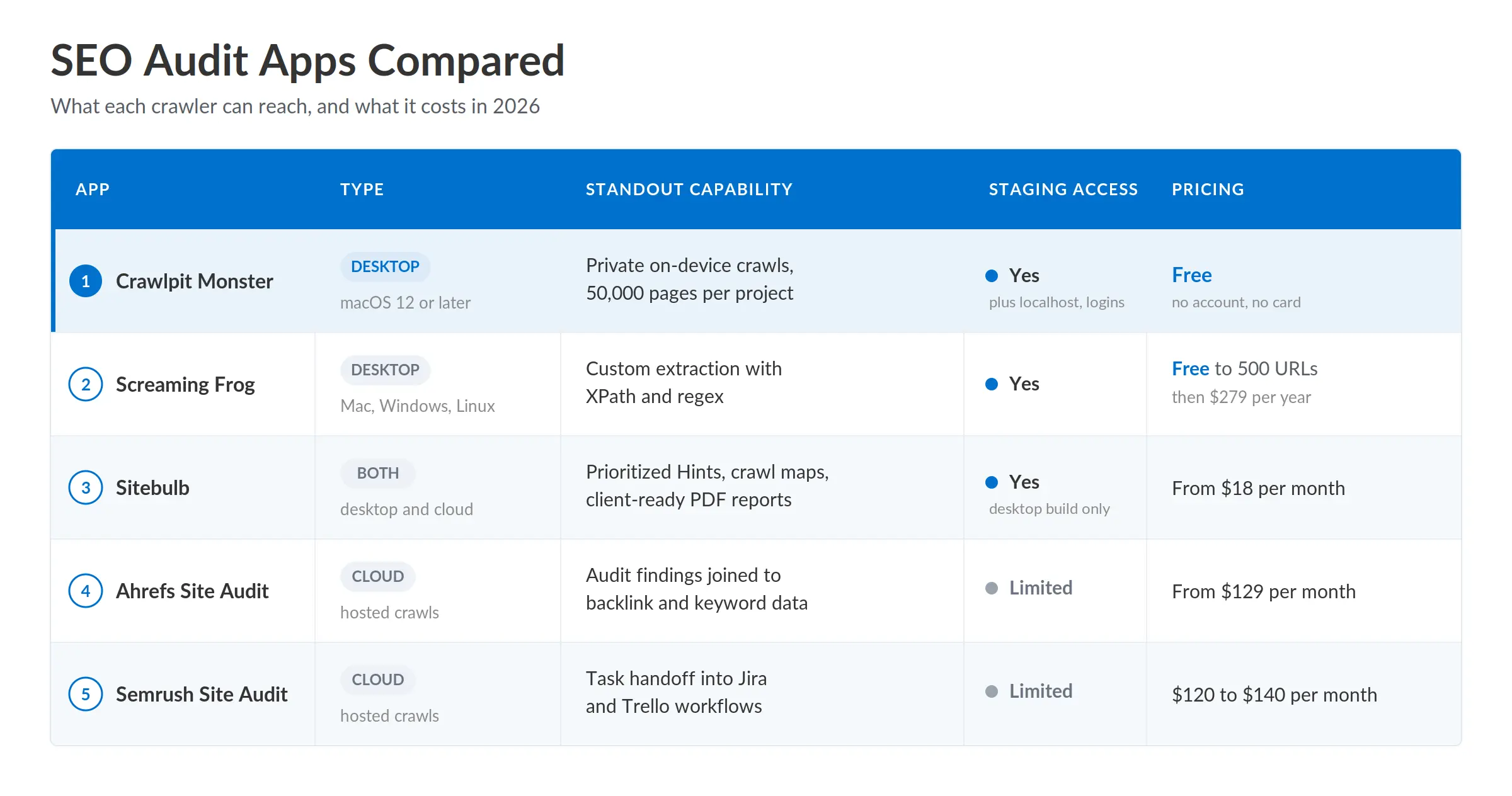
Prices reflect publicly listed vendor rates and shift with promotions, currency, and annual billing discounts. Verify before you buy.
Which SEO Audit App Should You Actually Run?
Match the tool to the constraint that hurts most in your workflow.
If your bottleneck is budget, start local. A free desktop crawler that handles 50,000 pages removes the entire question of whether this month’s audit is worth a credit.
If your bottleneck is client confidentiality, on-device crawling is not a preference, it is a compliance position. Ask the vendor where crawl data is stored and for how long, and if the answer requires reading a subprocessor list, that tells you something.
If your bottleneck is reporting time, pay for Sitebulb and stop rebuilding slide decks by hand.
If your bottleneck is context switching between six tools, a cloud suite earns its subscription by keeping audit, backlink, and ranking data in one login.
One caveat worth stating plainly: no crawler replaces Search Console. Third-party tools show you what exists on the site. Google’s crawl budget documentation is explicit that crawl capacity and crawl demand are determined on Google’s side, and that sites above roughly 10,000 rapidly changing URLs are where crawl efficiency starts to bite. Run both. The crawler tells you what to fix; Search Console tells you whether the fix registered.
Common Questions About SEO Audit Tools
What is the best free SEO audit app?
For Mac users, Crawlpit Monster offers the largest free crawl allowance at 50,000 pages per project, with no account and no card. Screaming Frog’s free tier is the cross-platform alternative but caps each crawl at 500 URLs and locks saving, scheduling, and JavaScript rendering behind the paid licence.
Can SEO audit apps crawl a staging site?
Desktop crawlers can, because the request originates from your machine and inherits your network access. Cloud crawlers usually need IP allowlisting or credential sharing, and some cannot reach non-public environments at all.
Do I need a full crawler to check a single page?
No. A browser extension that reads the rendered DOM covers the on-page signals: title, meta, headings, schema, alt text, and indexability. Anything comparative, such as duplicate titles, inlinks, or orphan status, needs a site-wide crawl, because a single page has no way to know what the rest of the site looks like.
How often should you run a technical SEO audit?
Monthly for sites publishing weekly, quarterly for stable brochure sites, and always immediately before and after a migration. Deployment-triggered crawls catch regressions faster than any fixed schedule.
Are desktop crawlers slower than cloud tools?
Speed depends on your hardware, your connection, and the crawl rate you configure. Desktop crawls on a modern machine are frequently faster than queued cloud crawls, though very large sites (past several hundred thousand URLs) can exhaust local RAM and storage.
Do free SEO audit apps miss issues that paid tools catch?
Sometimes. Paid tiers typically add historical comparison, accessibility auditing, and scheduled monitoring. JavaScript rendering used to be a reliable paywall marker and is no longer, since some free desktop crawlers now offer it as a per-crawl toggle.
Is it safe to give a cloud SEO platform access to a client site?
It depends on the contract. Read the data processing terms, check retention periods, and confirm the client’s agreement permits third-party subprocessors. Where it does not, a local crawler is the simpler answer.
The Short Version
Choosing between SEO audit apps in 2026 is a question of constraints, not features. Cloud suites make sense for teams already living inside them. For technical accuracy, pre-launch access, and client data that never leaves your desk, local crawlers now hold the stronger position, and the pricing trend at the cloud end is not reversing.
If you work on a Mac, there is no cost to testing that claim. Download the free Crawlpit Monster desktop app, point it at a site you already know well, and read the full report. Compare what it surfaces against your current tool, then decide what deserves a subscription.
Author: Neha Jain
Neha Jain is a software engineer focused on payments and API-driven integrations, including webhooks, authentication, error handling, and secure deployment patterns. Her work emphasizes production-ready implementations, with attention to vendor specifications, common failure modes, and integration reliability. She brings a practical approach to system design, balancing performance, security, and maintainability. Neha’s focus is on helping teams implement complex technical workflows with clarity and fewer regressions.
Related Posts
- How to Migrate From WooCommerce to Shopify: A Step-by-Step Guide
- Algolia vs Elasticsearch vs Meilisearch for Ecommerce Search
- Shopify vs WooCommerce for Small Businesses: Which Costs Less to Run?
- What Counts as Valid Consent Under DPDPA, and How to Implement It in WooCommerce
- Top 10 WordPress Plugins to Supercharge Your WooCommerce Store
- How Much Does It Cost to Build a Shopify App in 2026?
