
Implementation-focused articles on building software that scales cleanly.
How to Migrate From WooCommerce to Shopify: A Step-by-Step Guide
Moving a store from WooCommerce to Shopify is not a copy-paste job. The data export is the easy part. What takes real work, and what wrecks stores that rush it, is rebuilding the storefront, mapping every old URL to its new home, and verifying that payments, taxes, and integrations all fire correctly on the new platform. Get those right and customers never notice the switch. Get them wrong and you can lose data, checkout, and months of hard-won search rankings.
This guide walks through the entire WooCommerce to Shopify migration from start to finish: why merchants make the move, exactly what transfers and what doesn’t, the step-by-step sequence, how to protect your SEO, how long it takes, and the pitfalls that catch people out. We run managed migrations, so the process here reflects how it actually goes rather than the sanitized version.
Key takeaways
- The data migration (products, customers, orders) usually takes about a day. The theme rebuild, redirect map, and integration testing take the real time, from a few days for tiny stores to several weeks for large ones.
- 301 redirects are mandatory. Every product, collection, and blog URL changes between the two platforms, so a complete old-to-new redirect map is the single most important step for keeping your rankings.
- Products, customers, and orders migrate cleanly. Reviews, subscriptions, custom fields, and some tax rules need manual work.
- A short ranking dip after launch is normal. With a clean redirect map, most stores recover within about eight weeks.
Why Move From WooCommerce to Shopify?
Merchants move from WooCommerce to Shopify to trade self-hosted maintenance for a managed platform that handles infrastructure, security, and uptime for them. WooCommerce gives you full ownership of your store, which is a genuine advantage when you have developer resources and need deep customization. It becomes a liability when your team spends more hours patching plugins, chasing security updates, and scaling servers than actually selling.
Shopify flips that equation. It manages hosting, PCI compliance, core commerce infrastructure, and platform updates, so a predictable environment scales without anyone thinking about server configuration. Many merchants also find the total cost of ownership drops once they stop paying for hosting, security tooling, developer maintenance, and the occasional emergency fix. If you want the full financial comparison before you commit, our breakdown of Shopify versus WooCommerce running costs covers where each platform wins.
The move is a strategic one, not a cosmetic one. It usually makes sense when maintenance has become a bottleneck to growth.
When You Should Not Migrate
Migration is the wrong call for some stores, and it is worth being honest about that before you spend a dollar. Staying on WooCommerce often makes more sense if your store depends on deep, custom-coded functionality that you maintain in-house, since that flexibility is exactly what an open platform is built for.
Think twice if any of these describe you. You rely on WooCommerce-only plugins that have no clean Shopify equivalent. You run complex subscription logic or intricate, region-specific tax rules that would be expensive to rebuild. Or you have a capable development team that already runs the platform efficiently and treats maintenance as a normal cost of doing business. In those cases, the migration effort may outweigh the benefit. The right answer always comes from your specific setup, not from a trend.
What Transfers to Shopify, and What Doesn’t
Products, customers, and orders transfer to Shopify reliably through migration apps or CSV import. The content that needs manual attention is reviews, subscriptions, custom fields, static pages, and complex tax configurations. Knowing the split before you start is what keeps a migration from stalling halfway through.
Here is how the main data types break down:
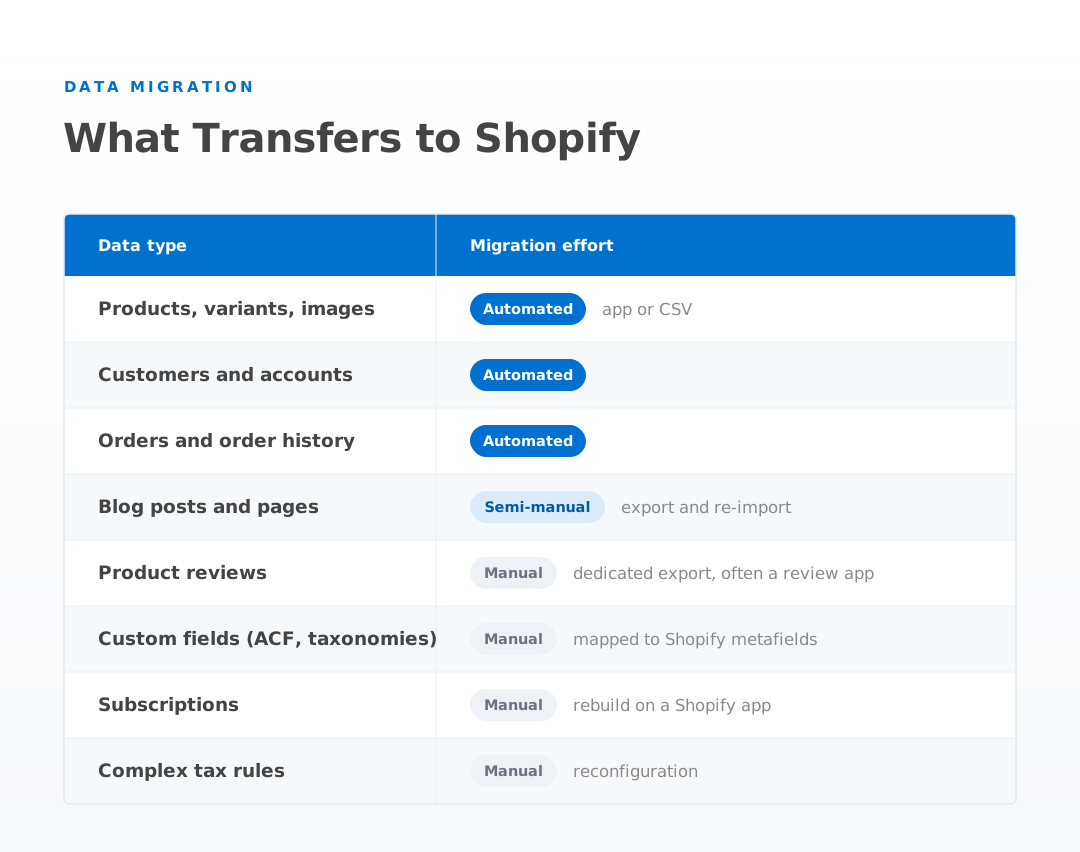
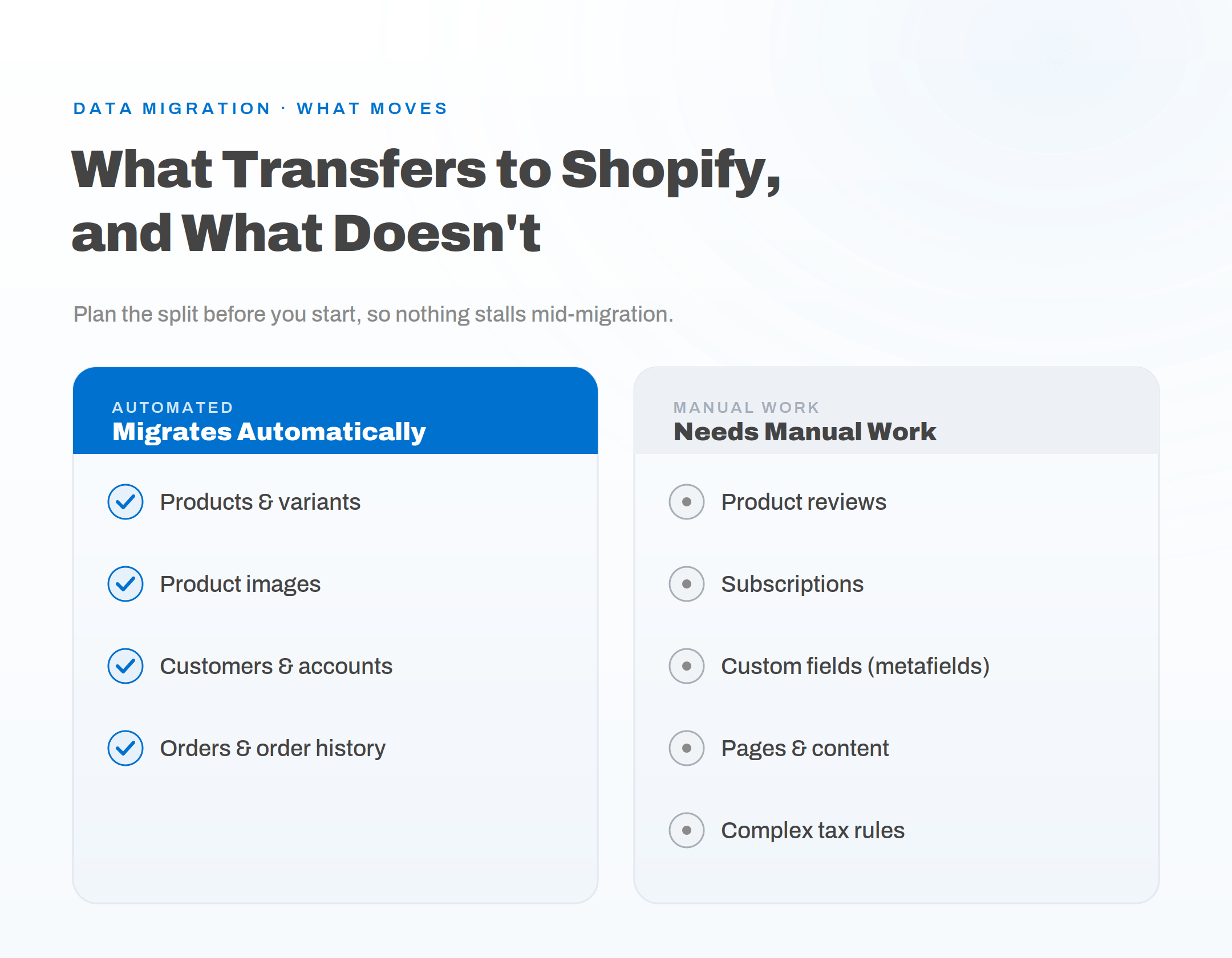
The important planning point is metafields. WooCommerce stores often carry custom fields through plugins like Advanced Custom Fields, and those map to Shopify metafields. Design your metafield schema before you migrate, because backfilling it after launch is painful and slow.
Before You Migrate: The Pre-Migration Checklist
Preparation is where a smooth migration is won or lost. Before you export a single file, work through four groundwork phases so nothing slips through the gap on cutover day.
- Back up and document everything. Take a full backup of your WordPress and WooCommerce database and files. Document every custom plugin function so you can find a Shopify app equivalent or plan a rebuild.
- Record your SEO and analytics baseline. Crawl your site with a tool like Screaming Frog or Ahrefs and export every indexed URL into a spreadsheet. This becomes your redirect source list. Save your current Search Console data: keywords, impressions, and clicks, so you can measure recovery later.
- Set up the Shopify foundation. Create the store on a staging URL, choose a plan, and configure taxes, shipping zones, and payment gateways before any data lands.
- Plan the cutover. Decide your launch window, who tests what, and how you will monitor the first days. A migration without a cutover plan is a migration waiting to break.
How to Migrate From WooCommerce to Shopify, Step by Step
The migration itself follows a predictable sequence. The data steps are quick; the rebuild, redirect, and testing steps are where your time goes.
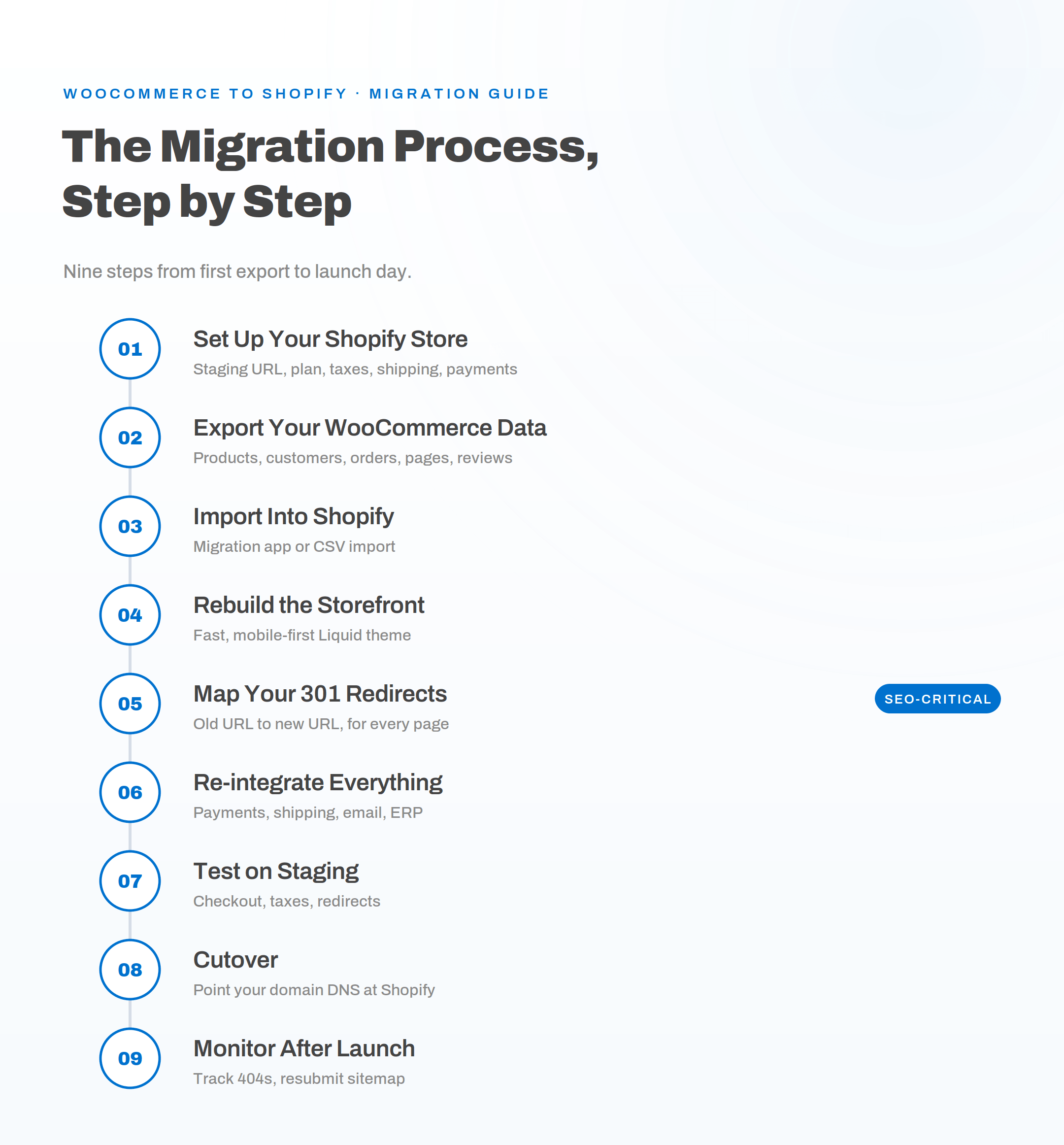
Step 1: Set Up Your Shopify Store
Create your Shopify store on a staging or development URL so nothing is public until it is ready. Choose your plan, then configure the essentials: tax settings, shipping zones, and your payment gateway, whether that is Shopify Payments or a third party.
Step 2: Export Your WooCommerce Data
Export products with WooCommerce’s built-in Product CSV Exporter, and use the WordPress export tool for pages and posts. Pull customers and orders through a plugin or the REST API. Reviews usually need their own dedicated export.
Step 3: Import Into Shopify
Bring the data in using a migration app or CSV import. Shopify’s own migration tool handles products, customers, and orders for most stores, and tools like Matrixify, Cart2Cart, and LitExtension cover larger or more complex catalogs. You can follow the official process in Shopify’s migration documentation.
Step 4: Rebuild the Storefront
Do not simply clone your old design. Use the migration as the moment to build a clean, fast, mobile-first Liquid theme that converts. This is one of the steps that takes real time, so scope it early rather than treating it as an afterthought.
Step 5: Map Your 301 Redirects
Build a spreadsheet with two columns, old URL and new URL, covering every product, collection, page, and blog post. Import the redirects into Shopify before you switch your domain, and test a sample of them on the staging store. This step protects your rankings and is not optional.
Step 6: Re-integrate Apps, Payments, and Email
Reconnect everything that made the old store work: payment capture, shipping rules, your email platform such as Klaviyo, and any ERP or inventory systems. Where a WooCommerce plugin has no direct Shopify app, plan how to rebuild that function.
Step 7: Test Everything on Staging
Before you touch DNS, test the full journey on the staging URL. Run real checkout tests, confirm tax calculations, verify shipping rates, and click through a batch of redirects to confirm they resolve.
Step 8: Cutover and Point Your Domain
When testing passes, point your domain’s DNS at Shopify. Your domain carries over cleanly, so there is no need to change domains or lose your brand address. This is the moment the new store goes live.
Step 9: Monitor After Launch
For the first week, watch closely for 404 errors and broken redirects, and confirm every payment gateway is capturing funds correctly. Over the following weeks, audit your data again, check that customer accounts log in, and resubmit your sitemap in Search Console.
How to Protect Your SEO During the Migration
You protect your SEO by redirecting every old URL to its new Shopify address with a 301 redirect, because the two platforms use different URL structures. WooCommerce product links look like /product/item-name/ and categories like /product-category/name/, while Shopify uses /products/item-name and /collections/name. Without a redirect map, every one of those links breaks the moment you go live, and the ranking authority they carried is lost.
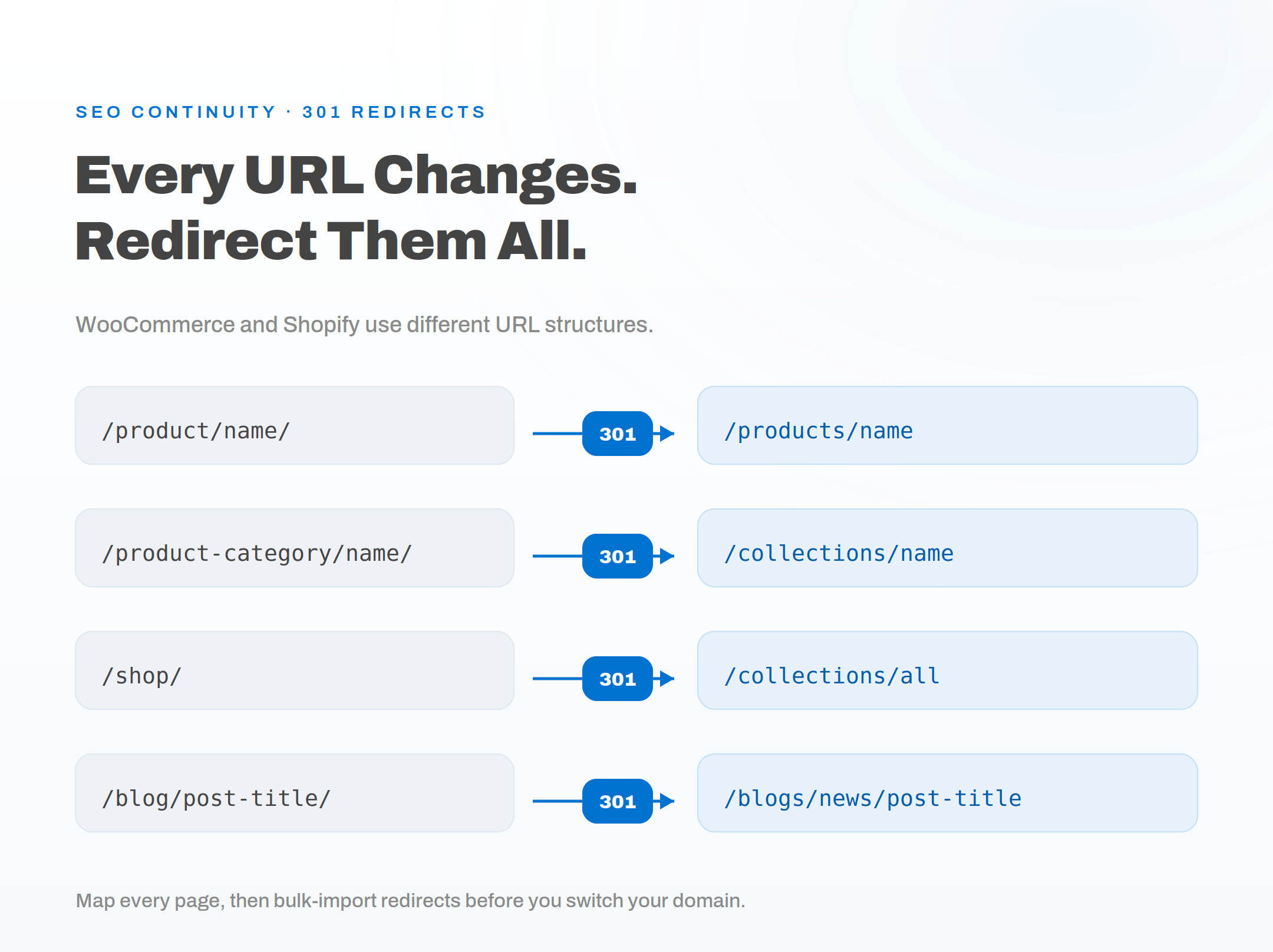
Redirects are the foundation, but a few more signals need to move with your content. Carry your meta titles and descriptions across into Shopify’s SEO fields exactly, since even a small change to a high-ranking title can dent click-through and rankings. Preserve your heading structure and body copy so pages keep the keyword relevance they earned. Keep image alt text intact, because product images often drive image-search traffic. Then recreate and resubmit your sitemap, which Shopify generates automatically at /sitemap.xml.
Expect some movement. A ranking dip in the first two to four weeks is normal while search engines re-crawl and re-index. Stores with a clean, complete redirect map usually recover within about eight weeks. Stores with redirect gaps recover slowly or lose ground for good, which is why the URL map deserves real care. For the technical detail, Google publishes clear guidance on site moves with URL changes.
How Long Does a WooCommerce to Shopify Migration Take?
A WooCommerce to Shopify migration takes anywhere from a few days to several weeks, depending on store size and complexity. The data itself moves in about a day; the theme rebuild, redirect mapping, and integration testing are what stretch the timeline. Here is a realistic guide:
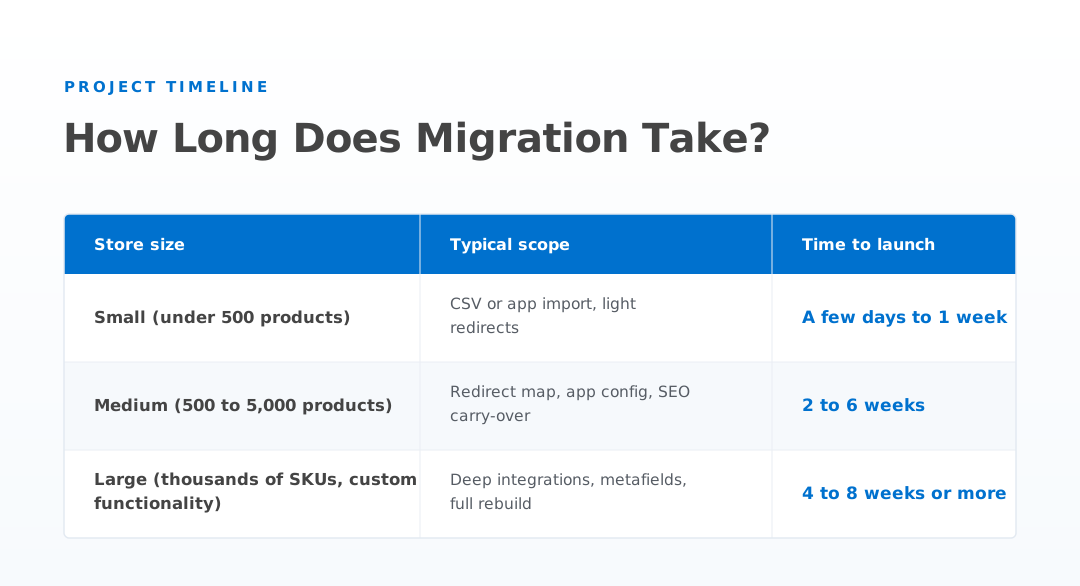
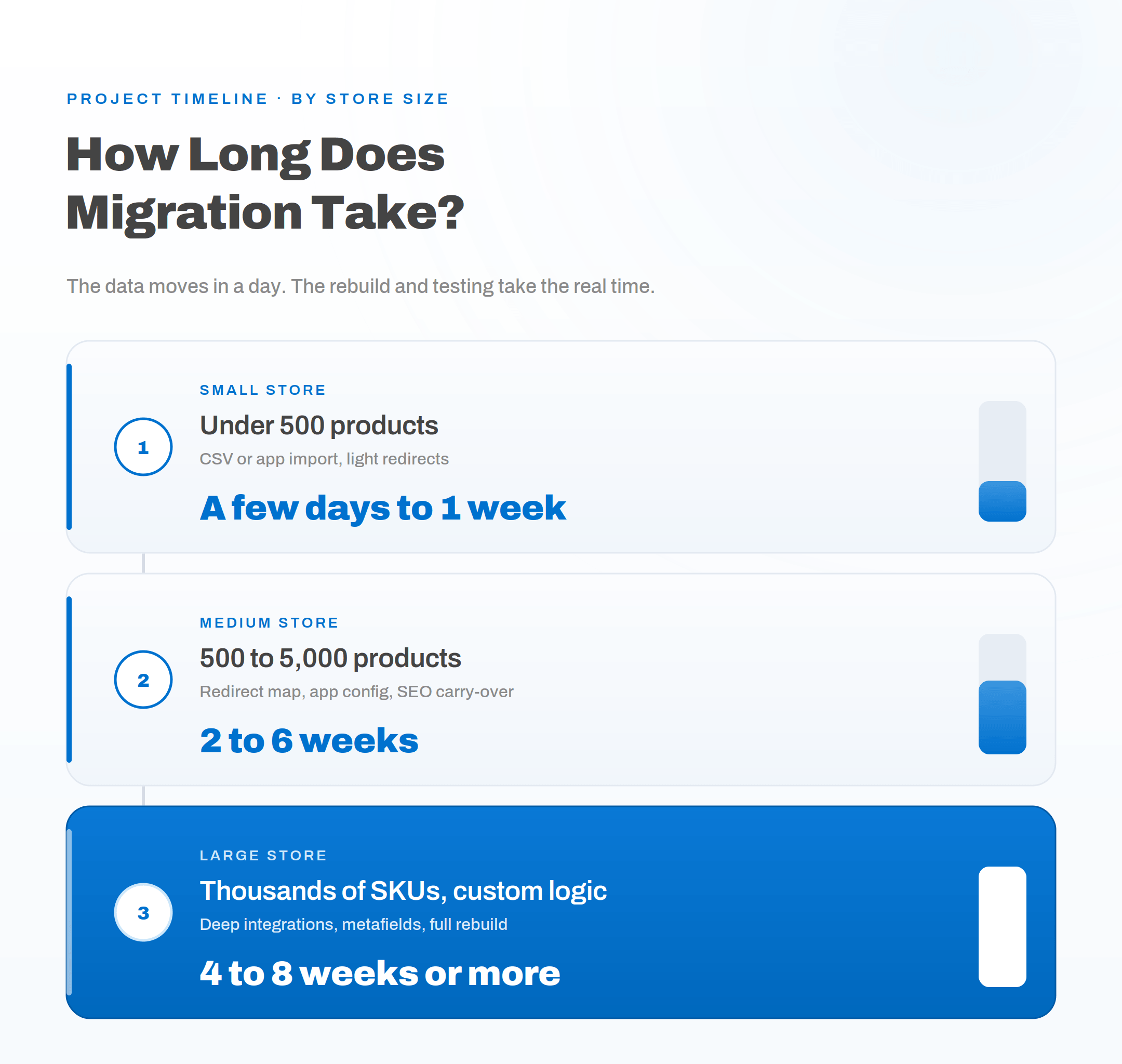
The pattern holds at every size: the migration app does the fast part, and the careful, business-critical work happens around it.
Common Migration Pitfalls, and How to Avoid Them
Most failed migrations fail in the same predictable places. Knowing them in advance is half the fix.
- Redirect gaps. A partial URL map is the most common cause of lost traffic. Map every page, not just products, and prioritize the pages that drive the most traffic first.
- Subscriptions. Recurring billing does not transfer as-is. It has to be rebuilt on a Shopify subscription app, and customer payment tokens rarely move, so plan the re-enrollment carefully.
- Complex taxes. Region-specific tax rules need to be reconfigured and tested, not assumed.
- Metafield schema. Custom fields left unplanned turn into a slow, manual backfill after launch. Design the schema first.
- Lost plugin functionality. Some WooCommerce features have no off-the-shelf Shopify match. When that happens, the clean fix is a custom build. Our Shopify app development team rebuilds that logic as a proper Shopify app so you don’t lose the feature in the move.
- Skipping the staging test. Going live without a full end-to-end test on staging is how broken checkout reaches real customers.
Should You Migrate Yourself or Hire a Team?
You can run a small, simple migration yourself with a migration app, but the more revenue, SEO history, and custom functionality your store carries, the stronger the case for professional help. A botched migration can mean downtime, lost orders, and rankings that take months to claw back, and that risk usually costs more than doing it properly the first time.
A managed migration handles the parts that quietly go wrong: a complete redirect map, careful metafield mapping, integration testing, and SEO continuity so your traffic holds through the switch. For a lean catalog with no custom logic, DIY is reasonable. For anything with real traffic or complexity, a team that has done it before is the safer investment.
Frequently Asked Questions
Will I lose my SEO rankings when I migrate from WooCommerce to Shopify? Not if you set up 301 redirects for every URL and carry your metadata across. A small ranking dip in the first two to four weeks is normal while search engines re-crawl your site, and stores with a complete redirect map usually recover within about eight weeks. Skipping redirects is what causes lasting traffic loss.
Can I keep my domain name? Yes. Your domain transfers cleanly during a WooCommerce to Shopify migration. You simply point your domain’s DNS at Shopify, and no domain change or rebranding is required.
What data can be migrated automatically? Products, customers, and orders migrate automatically through Shopify’s migration tool or a third-party app. Reviews, subscriptions, custom fields, static pages, and complex tax rules typically need manual work.
How long does a WooCommerce to Shopify migration take? Small stores can move in a few days, medium stores in two to six weeks, and large or complex stores in four to eight weeks or more. The data import takes about a day; the theme rebuild, redirect map, and integration testing account for most of the timeline.
How much does a WooCommerce to Shopify migration cost? Cost depends on catalog size, custom functionality, and how much of the storefront is rebuilt. A simple DIY migration can cost little beyond a migration app, while a professional migration for a large or complex store scales with the redirect mapping, integrations, and custom development involved.
Ready to Migrate Without Losing Data or Rankings
A clean migration comes down to preparation, a complete redirect map, and careful testing before you go live. Handle those well and the move to Shopify is smooth for you and invisible to your customers.
Author: Neha Jain
Neha Jain is a software engineer focused on payments and API-driven integrations, including webhooks, authentication, error handling, and secure deployment patterns. Her work emphasizes production-ready implementations, with attention to vendor specifications, common failure modes, and integration reliability. She brings a practical approach to system design, balancing performance, security, and maintainability. Neha’s focus is on helping teams implement complex technical workflows with clarity and fewer regressions.
Related Posts
- Top 5 SEO Audit Apps for 2026 (And Why Local Crawlers are Winning)
- Algolia vs Elasticsearch vs Meilisearch for Ecommerce Search
- Shopify vs WooCommerce for Small Businesses: Which Costs Less to Run?
- What Counts as Valid Consent Under DPDPA, and How to Implement It in WooCommerce
- Top 10 WordPress Plugins to Supercharge Your WooCommerce Store
- How Much Does It Cost to Build a Shopify App in 2026?
